

The authorization flow uses OAuth2, which requires a client_id and client_secret to connect. To obtain these credentials, send an email request to [email protected].
API Mailing List
You can subscribe to our mailing list if you want to be kept up-to-date regarding any change we push to our API.
API Changes
Non-breaking changes, such as adding data to a payload or implementing a new endpoint, can happen at any time without any advance warning. Breaking changes, such as removal of data from a payload or removal of an endpoint, will be communicated in advance, with the length of deprecation notice proportional to scope & impact of the change.
OAuth endpoints
Base URL
The base URL for authentication depends on how the firm signs in to Silverfin:
| Sign-in type | Base URL |
|---|---|
| Standard (default) | https://connect.getsilverfin.com |
| Legacy authentication | https://live.getsilverfin.com |
| SSO (e.g. Azure) | The firm's own subdomain, e.g. https://mycompany.getsilverfin.com |
Recommended: use connect.getsilverfin.com as the default in your integration, and let users change it to live or their own subdomain in your settings. That way every firm can set up the connection themselves, without contacting you or Silverfin.
Note: this base URL only applies to the two OAuth endpoints below. Once you have an access token, use the regular API URLs from this documentation.
1. Authorization
Redirect the user to:
{base_url}/oauth/authorize
Pass the requested scopes in the scope parameter, separated by spaces.
The user can grant access to any firm they belong to. The response contains:
code: the authorization codeauthorized_firm_id: the firm your application can access
Store authorized_firm_id. You need it for every request after this one.
2. Access token request
Exchange the authorization code for an access token at:
{base_url}/f/:firm_id/oauth/token
Replace :firm_id with the authorized_firm_id from step 1.
Access Token Request
URL must include firm_id: https://live.getsilverfin.com/f/:firm_id/oauth/token
OAuth Flow
We use standard OAuth. The typical flow goes like this:
- Perform a GET request to /oauth/authorize with url parameters client_id, redirect_uri, scope (a space separated list of requested scopes) and response_type=code
- Once the firm admin user grants your app permission to access their data, the browser will redirect to redirect_uri with a URL parameter code
- With this code, your application will have 10 minutes to perform a POST request to /oauth/token with parameters client_id, client_secret, code, redirect_uri and grant_type=authorization_code
After following these steps, you will have an access token and a refresh token. The access token is valid for 2 hours, while the refresh token currently remain valid for 60 days.
With the refresh token, you can request a new access token / refresh token pair:
- Perform a POST request to /oauth/token with parameters: client_id, client_secret, refresh_token, redirect_uri and grant_type=refresh_token
- Each refresh token can be used only once
- As soon as the new access token is used to access the API for the first time, the previous refresh token will be revoked
Scopes
We currently support the following scopes for the SyncAPI: financials:transactions:sync + Webhooks
The scopes are also coupled to the application and added to the application based on your needs.
Error Codes
When an error occurs, we return a response with a specific status code and a JSON payload with the following format:
{ error: "A message describing the issue." }Please refer to the following table when you receive such an error:
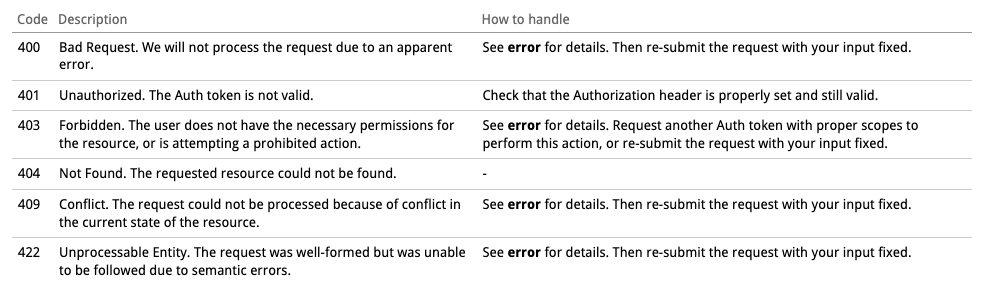
If the body is present in a request, with a Content-Type header value that is of an unsupported type, a "415 Unsupported Media Type" error code will be returned by the Silverfin (Sync)API.
In case the Content-Type header is missing or malformed, the API will return a 403 Forbidden response.
Internationalization
Endpoint outputs and generated documents can be translated by passing the Accept-Language header, such as
curl -X GET --header 'Accept: application/json' --header 'Accept-Language: nl' --header 'Authorization: ...' 'http://localhost:3000/api/v4/f/...'