

Unreconciled
The unreconciled tag is used to indicate when a template is (un)reconciled.
Unreconciled tags are used to indicate whether or not a template (account or reconciliation template) is reconciled; this is used quite often and has a direct impact on the progress of the workflow.
When all unreconciled tags have zero as an outcome (not to be mistaken for empty), the template will be fully reconciled and a green dot will be visible at the template level.
{% assign income_accounts_total = period.accounts | range:"70" %}
{% unreconciled -income_accounts_total-table_total %}
A common scenario is detailing amounts in a table, then checking that value against the value on the trial balance. In the example above we take the income accounts, so we invert it with a minus, and the local variable table_total which is the sum of all inputs. It's also common to have users detail information as positives, so the table_total does not need its sign reversed.


Unreconciled as indicator
When using more than one unreconciled tag, it can become hard to see which parts of the template need to be reconciled.
Therefore we suggest to always use the unreconciled tag as an indicator: this means the output of the formula in the unreconciled tag will be made visible with a red triangle (in case of unreconciled) or a green dot (in case of reconciled).
{% unreconciled -income_accounts_total-table_total as:indicator %} {{ -income_accounts_total | currency }}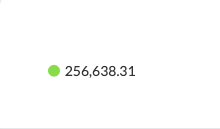
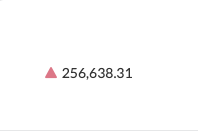
UX considerationEven if there is only one unreconciled tag in your template, it's good UX to display the indicator either way. It helps users find which part of the template is affecting the reconciliation status.
Unreconciled text attribute
When the indicator is unreconciled (red triangle), you can add a string of text to explain the difference by adding the unreconciled_text attribute.
{% unreconciled -income_accounts_total-table_total as:indicator unreconciled_text:'Difference explanation' %}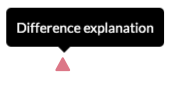
If you don't use the text attribute on an unreconciled indicator, hovering over it will just show the outcome of the formula.

Unreconciled Indicator positioning in non-bordered tables
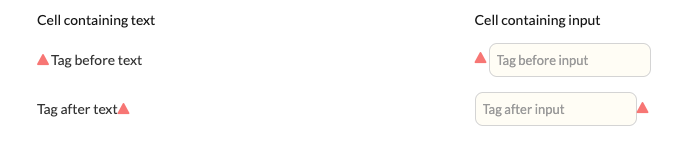
In non-bordered HTML and markdown tables, the unreconciled indicator appears just before or just after the text or input depending on where it is placed in the code.
Example of the unreconciled indicator in a non-bordered HTML table:
<table class="usr-width-100">
  <thead>
    <tr>
      <th class>Cell containing text</th>
      <th> Cell containing input</th>
    </tr>
  </thead>
  <tbody>
    <tr>
      <td>{% unreconciled 1 as:indicator %}Tag before text</td>
      <td>{% unreconciled 1 as:indicator%}{% input custom.test.number placeholder:"Tag before input" as:currency %}</td>
    </tr>
    <tr>
      <td>Tag after text{% unreconciled 1 as:indicator %}</td>
      <td>{% input custom.test.number placeholder:"Tag after input" as:currency %}{% unreconciled 1 as:indicator%}</td>
    </tr>
  </tbody>
</table>
Output
Example of the unreconciled indicator in a non-bordered markdown table:
{% stripnewlines %}
|----
|----+
{% newline %}
| Cell containing text
| Cell containing input
{% newline %}
| {% unreconciled 1 as:indicator %}Tag before text
| {% unreconciled 1 as:indicator %}{% input custom.test.number placeholder:"Tag before input" as:currency %}
{% newline %}
| Tag after text{% unreconciled 1 as:indicator %}
| {% input custom.test.number placeholder:"Tag after input" as:currency %}{% unreconciled 1 as:indicator %}
{% endstripnewlines %}
Output
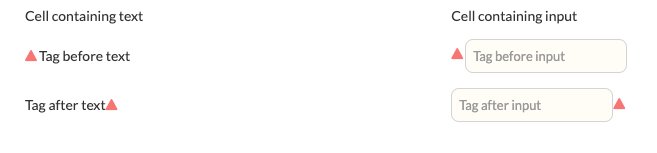
Changing the text-alignment in a cell moves the unreconciled indicator together with the text/input but preserves the order.
Unreconciled Indicator positioning in bordered tables
In bordered HTML tables, the unreconciled indicator aligns opposite to the cell's text alignment (in line with how input validation works):
- Left-aligned text → indicator aligns right
- Right-aligned text → indicator aligns left
- Centre-aligned text → indicator aligns right
- No alignment specified → text defaults to left, indicator defaults to right
This behaviour also applies to cells containing input fields.
Example alignments in a bordered HTML table with unreconciled indicators:
<table class="usr-bordered usr-width-50">
  <tbody>
    <tr>
      <td class="usr-width-50">Right alignment</td>
      <td class="usr-align-right">{% input custom.example1.test as:currency %}{% unreconciled 1 as:indicator %}</td>
    </tr>
    <tr>
      <td>Left alignment</td>
      <td class="usr-align-left">{% input custom.example2.test as:currency %}{% unreconciled 1 as:indicator %}</td>
    </tr>
    <tr>
      <td>Center alignment</td>
      <td class="usr-align-center">{% input custom.example5.test as:currency %}{% unreconciled 1 as:indicator %}</td>
    </tr>
    <tr>
      <td>No alignment</td>
      <td>{% input custom.example6.test as:currency %}{% unreconciled 1 as:indicator %}</td>
    </tr>
  </tbody>
</table>
Output
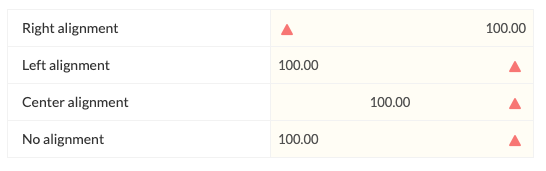
In bordered Markdown tables, if a cell contains an input field, an error occurs where the unreconciled indicator overlaps the value.

Updated 5 months ago